
YANC Pro - Google Play
You'll be able to see results in few seconds.
Publisher Description
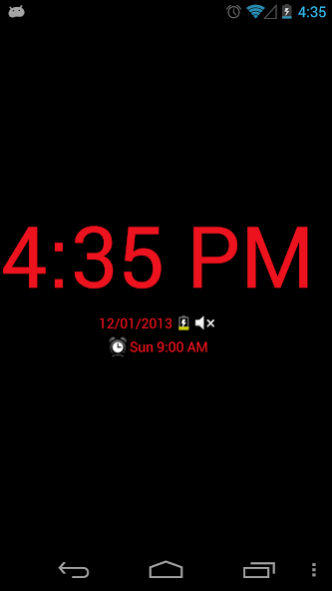
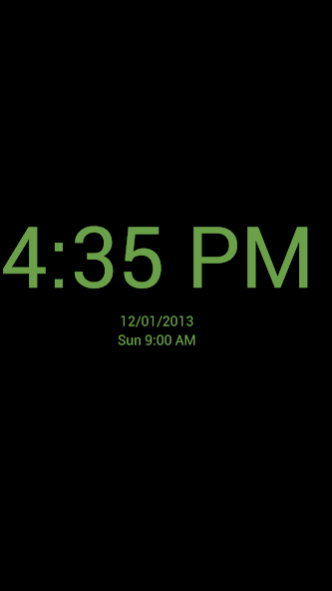
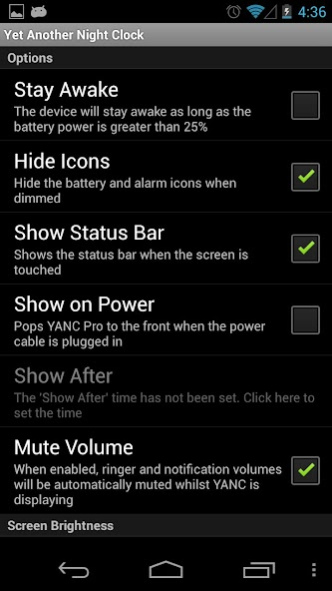
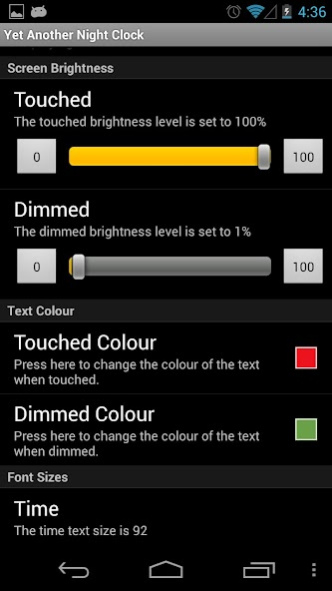
Yet Another Night Clock, Pro Version
*Cool new feature*
Wake the phone from sleep by waving your hand over the screen.
Note: This app uses the Device Administrator permission. This is required to enable 'Lock the screen'. You are prompted to enable this feature when you select the 'Off When Dimmed' option in the application's settings. To uninstall the application, you must disable the 'Off When Dimmed' option in the application's menu (because Android won't uninstall an app with active Device Administrator Permissions :-/ )
Features:
- Much dimmer
- Moves the time around the screen every minute
- Roll-over animation of digits.
- Touching the screen brightens it for 5 seconds
- Shows the time of the next alarm
- Change text colours
- Do Not Disturb option to mute ringer and notifications (Alarm still rings)
Try the free version first to check if all the dimming and alarm features work on your phone.
Visit our website for more information http://softwyer.wordpress.com/2011/06/24/introducing-yanc/
====
Differences between Pro and Free versions?
- Option to turn off the screen and only show the time if you wave your hand over the device (uses the proximity sensor)
- Set the dimmed and touched screen dimness
- Set the dimmed and touched text colour
- Option to show Seconds as well as Hours and Minutes.
- Stay awake option on battery and power.
- Option to show the status bar when the screen is touched (to see/check your notifications)
- Option to pop YANC Pro to the front when power is connected, after a certain time.
- Long-press the time to toggle between an always on 'day mode' and the normal night clock. Note that day mode will dim with your normal Android screen dimming settings.
- Do Not Disturb option to mute Ringer and Notification. An icon is shown in the display when this is enabled
Some Notes about Stay Awake
===========================
The Stay Awake option will allow YANC to keep running, when it is on battery. A battery level indicator, shown next to the date, indicates that you have Stay Awake enabled.
If you are on battery and the battery level drops below 25%, then the device will remove the wake lock and it should switch off after the normal screen timeout.
Please test this feature, at a non-critical time, to ensure that this works on your device. Whilst we've taken every precaution to ensure this works, we cannot be held responsible if you leave this running and it drains your battery making you late for your wedding/work/lottery purchase/Mother-in-Law visit (*)
* Delete as appropriate or replace with worst case scenario.
====
Permissions
It needs to be able to read and write Settings to turn off Auto-Brightness otherwise it will not dim the screen.
The ability to turn off the screen requires a Device Administrator permission.
It uses a Wake Lock to keep the screen on.
====
Note to Google Play Support Team (since there is no other way of contacting you :-/ )
This app uses 'Device Admin Permissions' to 'Lock the screen'. Its use is mentioned above in this note and in the Terms and Conditions shown at the start of the application. When the user enables this permission, they are prompted with the default Android Admin Permissions dialog that explains why this permission is required. They can disable this permission by unchecking the menu option in the application, or via Android's system menu.
About YANC Pro
The company that develops YANC Pro is SoftWyer. The latest version released by its developer is 1.0 .
To install YANC Pro on your Android device, just click the green Continue To App button above to start the installation process. The app is listed on our website since 2017-08-19 and was downloaded 0 times. We have already checked if the download link is safe, however for your own protection we recommend that you scan the downloaded app with your antivirus. Your antivirus may detect the YANC Pro as malware as malware if the download link to com.softwyer.yanc.pro is broken.
How to install YANC Pro on your Android device:
- Click on the Continue To App button on our website. This will redirect you to Google Play.
- Once the YANC Pro is shown in the Google Play listing of your Android device, you can start its download and installation. Tap on the Install button located below the search bar and to the right of the app icon.
- A pop-up window with the permissions required by YANC Pro will be shown. Click on Accept to continue the process.
- YANC Pro will be downloaded onto your device, displaying a progress. Once the download completes, the installation will start and you'll get a notification after the installation is finished.
Program Details
System requirements
Download information
Pricing
Version History
version
posted on 2017-08-19
v1.17.1
+ Display Terms and Conditions to comply with Google Policies
v1.17.0
+ Updated to 'Material Design' UI
+ New settings icon as some devices couldn't display the menu (thanks Hans)
v1.16.2
+ Notification vibrations are also muted
+ Fixed a bug when using lock screens
More details can be found on our Google Plus site here -> https://plus.google.com/113750147836457488590
version
posted on 2016-12-22
v1.17.0,+ Updated to 'Material Design' UI,+ New settings icon as some devices couldn't display the menu (thanks Hans),v1.16.2,+ Notification vibrations are also muted,+ Fixed a bug when using lock screens,More details can be found on our Google Plus site here -> https://plus.google.com/113750147836457488590
version 1.13.1
posted on 2013-06-20
Several fixes and updates
Disclaimer
Official Google Play Link
We do not host YANC Pro on our servers. We did not scan it for viruses, adware, spyware or other type of malware. This app is hosted by Google and passed their terms and conditions to be listed there. We recommend caution when installing it.
The Google Play link for YANC Pro is provided to you by apps112.com without any warranties, representations or guarantees of any kind, so access it at your own risk.
If you have questions regarding this particular app contact the publisher directly. For questions about the functionalities of apps112.com contact us.
